什么是tauri框架? Tauri 是一个用于构建桌面应用的开源框架:前端用任意会输出 HTML/JS/CSS 的框架(如 React/Vue/Svelte),后端用 Rust(或平台原生)打包成本地可执行文件。它通过 WebView 显示前端页面,并通过安全的 IPC(消息调用)把前端和 Rust 后端连接起来。
简单来说就是tarti框架构建出来的exe文件,集成了前端和后端代码,打包进了exe。运行这个exe,前端代码通过系统webview就可以在界面显示而不需要借助任何浏览器
通常tauri框架写出的app长上面那样
tauri框架逆向: 运行逻辑:
逆向步骤: 一般flag都放在exe的静态资源部分。Tauri 会根据配置文件中是否开启压缩来打包静态资源文件,若压缩选项开启(默认情况),其会使用 brotli 算法对资源进行压缩后再打包。
我们可以找到静态资源所在地,然后dump下来用brotli解密后分析静态资源
拿2025年羊城杯的easyTauri.exe举例
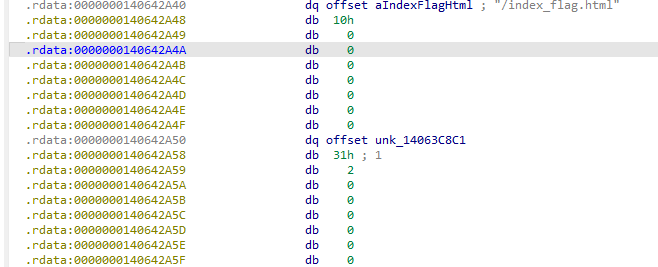
定位静态资源: 先shift+f12搜flag,如果没有就去找index.html,index.html就是最开始的web页面
定位到这个字符串后交叉引用,找到一个形似文件表结构的部分
其中
我们找到这个结构之后就把文件内容dump下来解密就好了
注意 brotli 对文件的完整性要求似乎很高,多一个或少一个字节都会报错。
这里给一个ida python的dump脚本:
1
2
3
4
5
6
7
8
9
10
11
12
13
14
import os, idcstart_ea = 0x14063C8C1 size = 0x231 out_path = os.path.join(os.path.dirname(idc.get_idb_path()) or os.getcwd(), "dump.bin" ) //拼接ida分析程序地址和自定义的文件名 data = idc.get_bytes(start_ea, size) with open (out_path, "wb" ) as f: if isinstance (data, str ): //这里if 分支是在处理python2中get_bytes函数返回str 类型的问题 f.write(data.encode('latin-1' )) //latin-1 是 1 字节一对一映射,如果用utf-8 可能报错 else : f.write(data) print ("Wrote:" , out_path)
然后拿到这个新的dump.bin文件后再用brotli算法解密
1
2
3
4
5
import brotlia = open (r"C:\Users\Lenovo\OneDrive\Desktop\dump.bin" , "rb" ).read() print (len (a))decompressed = brotli.decompress(a) open ("dump" , "wb" ).write(decompressed)
然后就拿到js写的前端文件了
前端分析 1 2 3 4 5 6 7 8 9 10 11 12 13 14 15 16 17 18 19 20 21 22 23 24 25 26 27 28 29 30 31 <!doctype html> <html lang ="en" > <head > <meta charset ="UTF-8" /> <link rel ="stylesheet" href ="styles.css" /> <meta name ="viewport" content ="width=device-width, initial-scale=1.0" /> <title > Tauri App</title > <script type ="module" src ="js/main.js" defer > </script > </head > <body > <main class ="container" > <div class ="row" > <a href ="https://tauri.app" target ="_blank" > <h1 > Welcome to Tauri 2.0</h1 > </a > </div > <p > 你知道的,这个文件往往是测试的时候使用的,当你找到了这个文件,说明你可以阅读以下hint:</p > <p > 1. 我混淆了js,当你觉得那是一大坨恶心玩意的时候,应该试试开发一个最简Tauri项目</p > <p > 2. 出题人吃过release无pdb的这一坨,当你分析完js一定能找到对应的native函数</p > <form class ="row" id ="greet-form" > <input id ="greet-input" placeholder ="Enter a Flag..." /> <button type ="submit" > Check</button > </form > <p id ="greet-msg" > </p > </main > </body > </html >
如果前端文件index没有flag,那就把所有js文件都dump下来看看
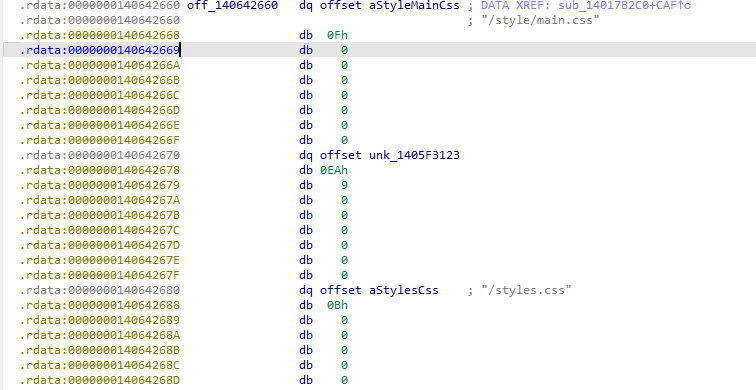
找到这种形似文件结构的最开始的地址,然后把他们全dump下来
把要求扔给ai写下面的脚本,但要求要说清楚
从0x140642660开始是文件结构,每个文件开始8个字节存储文件名地址,后8字节按小端序存储文件名对应字符串字节数,然后8个字节存文件内容地址,后8个字节存文件内容占大小,然后是下一个文件结构,帮我把所有的文件内容dump出来,然后通过brotli算法解密,还原js静态资源。只读js文件和html文件
1 2 3 4 5 6 7 8 9 10 11 12 13 14 15 16 17 18 19 20 21 22 23 24 25 26 27 28 29 30 31 32 33 34 35 36 37 38 39 40 41 42 43 44 45 46 47 48 49 50 51 52 53 54 55 56 57 58 59 60 61 62 63 64 65 66 67 68 69 70 71 72 73 74 75 76 77 78 79 80 81 82 83 84 85 86 87 88 89 90 91 92 93 94 95 96 97 98 99 100 101 102 103 104 105 106 107 108 109 110 111 112 113 114 115 116 117 118 119 120 121 122 123 124 125 126 127 128 129 130 131 132 ag-0 -1j8in2hh6ag-1 -1j8in2hh6 import os, sys, idc, idaapi, subprocess, tempfile, shutilTABLE_START = 0x140642660 ENTRY_SIZE = 32 MAX_ENTRIES = 10000 OUT_DIR = os.path.join(os.path.dirname(idc.get_idb_path()) or os.getcwd(), "dump_js_html" ) if not os.path.exists(OUT_DIR): os.makedirs(OUT_DIR) def read_qword (ea ): try : return idc.get_qword(ea) except : b = idc.get_bytes(ea, 8 ) if not b: return None v = 0 for i, by in enumerate (b if isinstance (b, bytes ) else b.encode('latin-1' )): v |= (by & 0xFF ) << (i*8 ) return v def read_bytes (ea, size ): return idc.get_bytes(ea, size) brotli_decompress = None try : import brotli brotli_decompress = brotli.decompress print ("[*] Using Python brotli module." ) except : try : import brotlicffi as brotli brotli_decompress = brotli.decompress print ("[*] Using brotlicffi module." ) except : brotli_decompress = None have_brotli_cli = shutil.which("brotli" ) is not None if not brotli_decompress and have_brotli_cli: print ("[*] Using brotli CLI for decompression." ) elif not brotli_decompress: print ("[!] Warning: no brotli module/CLI found; will save raw data only." ) ea = TABLE_START entry_idx = 0 results = [] for i in range (MAX_ENTRIES): name_addr = read_qword(ea) name_len = read_qword(ea + 8 ) content_addr = read_qword(ea + 16 ) content_size = read_qword(ea + 24 ) if not name_addr or name_addr == 0 : print (f"[*] End of table at {hex (ea)} " ) break name_bytes = read_bytes(name_addr, name_len) if not name_bytes: ea += ENTRY_SIZE continue try : filename = name_bytes.decode("utf-8" ) except : filename = name_bytes.decode("latin-1" , errors="replace" ) filename_clean = filename.replace("\\" , "_" ).replace("/" , "_" ).strip() if not (filename_clean.endswith(".js" ) or filename_clean.endswith(".html" )): ea += ENTRY_SIZE continue print (f"[+] Dumping {filename_clean} ..." ) data = read_bytes(content_addr, content_size) if not data: print (f" [!] Failed to read {filename_clean} " ) ea += ENTRY_SIZE continue decompressed = None if brotli_decompress: try : decompressed = brotli_decompress(data) except Exception as e: print (f" [!] Brotli module failed: {e} " ) elif have_brotli_cli: try : with tempfile.NamedTemporaryFile(delete=False ) as tmpf: tmpf.write(data) tmp_br = tmpf.name tmp_out = tmp_br + ".out" proc = subprocess.run(["brotli" , "-d" , "-o" , tmp_out, tmp_br], stdout=subprocess.PIPE, stderr=subprocess.PIPE) if proc.returncode == 0 and os.path.exists(tmp_out): with open (tmp_out, "rb" ) as tf: decompressed = tf.read() os.remove(tmp_br) if os.path.exists(tmp_out): os.remove(tmp_out) except Exception as e: print (f" [!] CLI brotli failed: {e} " ) out_path = os.path.join(OUT_DIR, filename_clean) if decompressed: with open (out_path, "wb" ) as f: f.write(decompressed) print (f" [+] Wrote decompressed -> {out_path} " ) results.append((filename_clean, "decompressed" )) else : with open (out_path + ".br" , "wb" ) as f: if isinstance (data, str ): f.write(data.encode('latin-1' )) else : f.write(data) print (f" [-] Saved raw brotli file -> {out_path} .br" ) results.append((filename_clean, "raw_only" )) ea += ENTRY_SIZE entry_idx += 1 print ("\n=== Dump Finished ===" )for name, status in results: print (f"{status:12 } {name} " ) print (f"\nOutput folder: {OUT_DIR} " )
出来的js文件里没有
的可以直接删了,因为最后逻辑要交给后端rust的话,必须要用win内核调用
1 const { invoke } = window .__TAURI__ .core ;
通常设为变量名invoke,但也可能是自定义的调用名,所以只搜索window.__TAURI__.core就可以了
最后我们在html_actuator.js里找到get_flag的变量名
分析这个js文件:
用在线网站解混淆一下
JS Deobfuscator
1 2 3 4 5 6 7 8 9 10 11 12 13 14 15 16 17 18 19 20 21 22 23 24 25 26 27 28 29 30 31 32 33 34 35 36 37 38 39 40 41 42 43 44 45 46 47 48 49 50 51 52 53 54 55 56 57 58 59 60 61 62 63 64 65 66 67 68 69 70 71 72 73 74 75 76 77 78 79 80 81 82 83 84 85 86 87 88 89 90 91 92 93 94 95 96 97 98 99 100 101 102 103 104 105 106 107 108 109 110 111 112 113 114 115 116 117 118 119 120 121 122 123 124 125 126 127 128 129 130 131 132 133 134 135 136 137 138 139 140 141 142 143 144 145 146 147 148 149 150 151 152 153 154 155 156 157 158 159 160 161 162 163 164 165 166 167 168 169 170 171 172 173 174 175 176 177 178 179 180 181 182 183 184 185 186 187 188 189 190 191 192 193 194 195 196 197 198 199 200 201 202 203 204 205 206 207 208 209 210 211 212 213 function HTMLActuator ( this .tileContainer = document .querySelector (".tile-container" ); this .scoreContainer = document .querySelector (".score-container" ); this .bestContainer = document .querySelector (".best-container" ); this .messageContainer = document .querySelector (".game-message" ); this .score = 0 ; } HTMLActuator .prototype actuate = function (grid, metadata ) { var self = this ; if (metadata.game ) { checkBox = document .querySelector (".check-form" ); checkBoxHtml = ` <form class="above-game" id="greet-form"> <input id="greet-input" placeholder="Enter a Flag..." /> <button type="submit">Check</button> </form> ` ; checkBox.innerHTML = checkBoxHtml; } window .requestAnimationFrame (function ( self.clearContainer (self.tileContainer ); grid.cells .forEach (function (column ) { column.forEach (function (cell ) { if (cell) { self.addTile (cell); } }); }); self.updateScore (metadata.score ); self.updateBestScore (metadata.bestScore ); if (metadata.terminated ) { if (metadata.over ) { self.message (false ); } else if (metadata.won ) { self.message (true ); } } }); }; HTMLActuator .prototype continueGame = function ( this .clearMessage (); }; HTMLActuator .prototype clearContainer = function (container ) { while (container.firstChild ) { container.removeChild (container.firstChild ); } }; HTMLActuator .prototype addTile = function (tile ) { var self = this ; var wrapper = document .createElement ("div" ); var inner = document .createElement ("div" ); var position = tile.previousPosition || { x : tile.x , y : tile.y }; var positionClass = this .positionClass (position); var classes = ["tile" , "tile-" + tile.value , positionClass]; if (tile.value > 2048 ) { classes.push ("tile-super" ); } this .applyClasses (wrapper, classes); inner.classList .add ("tile-inner" ); inner.textContent = tile.value ; if (tile.previousPosition ) { window .requestAnimationFrame (function ( classes[2 ] = self.positionClass ({ x : tile.x , y : tile.y }); self.applyClasses (wrapper, classes); }); } else if (tile.mergedFrom ) { classes.push ("tile-merged" ); this .applyClasses (wrapper, classes); tile.mergedFrom .forEach (function (merged ) { self.addTile (merged); }); } else { classes.push ("tile-new" ); this .applyClasses (wrapper, classes); } wrapper.appendChild (inner); this .tileContainer .appendChild (wrapper); }; HTMLActuator .prototype applyClasses = function (element, classes ) { element.setAttribute ("class" , classes.join (" " )); }; HTMLActuator .prototype normalizePosition = function (position ) { return { x : position.x + 1 , y : position.y + 1 }; }; HTMLActuator .prototype positionClass = function (position ) { position = this .normalizePosition (position); return "tile-position-" + position.x + "-" + position.y ; }; HTMLActuator .prototype updateScore = function (score ) { this .clearContainer (this .scoreContainer ); var difference = score - this .score ; this .score = score; this .scoreContainer .textContent = this .score ; if (difference > 0 ) { var addition = document .createElement ("div" ); addition.classList .add ("score-addition" ); addition.textContent = "+" + difference; this .scoreContainer .appendChild (addition); } }; HTMLActuator .prototype updateBestScore = function (bestScore ) { this .bestContainer .textContent = bestScore; }; HTMLActuator .prototype message = function (won ) { var type = won ? "game-won" : "game-over" ; var message = won ? "You win!" : "Game over!" ; this .messageContainer .classList .add (type); this .messageContainer .getElementsByTagName ("p" )[0 ].textContent = message; }; HTMLActuator .prototype clearMessage = function ( this .messageContainer .classList .remove ("game-won" ); this .messageContainer .classList .remove ("game-over" ); }; const { invoke } = window .__TAURI__ .core ; let greetInputEl;let greetMsgEl;(function (_0x97aee2, _0x14d3d9 ) { const _0x151017 = _0x363b; const _0x2b0390 = _0x97aee2 (); while (true ) { try { const _0x3b9dd4 = parseInt (_0x151017 (176 )) / 1 + parseInt (_0x151017 (172 )) / 2 + parseInt (_0x151017 (170 )) / 3 + -parseInt (_0x151017 (171 )) / 4 + -parseInt (_0x151017 (167 )) / 5 * (parseInt (_0x151017 (168 )) / 6 ) + -parseInt (_0x151017 (174 )) / 7 * (-parseInt (_0x151017 (166 )) / 8 ) + -parseInt (_0x151017 (173 )) / 9 ; if (_0x3b9dd4 === _0x14d3d9) { break ; } else { _0x2b0390.push (_0x2b0390.shift ()); } } catch (_0x34886e) { _0x2b0390.push (_0x2b0390.shift ()); } } })(_0x3a0b, 452532 ); function Encrypt_0xa31304 (_0x5031b3, _0xa31304 ) { const _0x22bac7 = _0x363b; const _0x5d7b84 = new TextEncoder ()[_0x22bac7 (169 )](_0x5031b3); const _0x2db5b9 = new TextEncoder ()[_0x22bac7 (169 )](_0xa31304); const _0x1f7f86 = new Uint8Array (256 ); let _0x562e52 = 0 ; for (let _0x24ca0d = 0 ; _0x24ca0d < 256 ; _0x24ca0d++) { _0x1f7f86[_0x24ca0d] = _0x24ca0d; _0x562e52 = (_0x562e52 + _0x1f7f86[_0x24ca0d] + _0x5d7b84[_0x24ca0d % _0x5d7b84[_0x22bac7 (175 )]]) % 256 ; [_0x1f7f86[_0x24ca0d], _0x1f7f86[_0x562e52]] = [_0x1f7f86[_0x562e52], _0x1f7f86[_0x24ca0d]]; } let _0x5b36c3 = 0 ; let _0x205ec1 = 0 ; const _0x444cf9 = new Uint8Array (_0x2db5b9[_0x22bac7 (175 )]); for (let _0x527286 = 0 ; _0x527286 < _0x2db5b9[_0x22bac7 (175 )]; _0x527286++) { _0x5b36c3 = (_0x5b36c3 + 1 ) % 256 ; _0x205ec1 = (_0x205ec1 + _0x1f7f86[_0x5b36c3]) % 256 ; [_0x1f7f86[_0x5b36c3], _0x1f7f86[_0x205ec1]] = [_0x1f7f86[_0x205ec1], _0x1f7f86[_0x5b36c3]]; const _0x326832 = (_0x1f7f86[_0x5b36c3] + _0x1f7f86[_0x205ec1]) % 256 ; _0x444cf9[_0x527286] = _0x2db5b9[_0x527286] ^ _0x1f7f86[_0x326832]; } return _0x444cf9; } function _0x363b (_0x3e7d70, _0x4a2c88 ) { const _0x3a0bb6 = _0x3a0b (); _0x363b = function (_0x363b1f, _0x4025c1 ) { _0x363b1f = _0x363b1f - 166 ; let _0x387f5b = _0x3a0bb6[_0x363b1f]; return _0x387f5b; }; return _0x363b (_0x3e7d70, _0x4a2c88); } function _0x3a0b ( const _0x37fb1e = ["3283052tzDAvB" , "542866JdmzNj" , "4112658rTyTXQ" , "16954tUYpad" , "length" , "457163LwGIuU" , "2696pusaTH" , "233035azfeoA" , "66oGYEyB" , "encode" , "2094372kZRrIa" ]; _0x3a0b = function ( return _0x37fb1e; }; return _0x3a0b (); } function uint8ArrayToBase64 (array ) { const binary = Array .from (array).map (byte =>String .fromCharCode (byte)).join ("" ); return btoa (binary); } async function _0x9a2c6e7 ( greetInputEl = document .querySelector ("#greet-input" ); greetMsgEl = document .querySelector ("#greet-msg" ); let getFlag = greetInputEl.value ; const ciphertext = Encrypt _0xa31304("SadTongYiAiRC4HH" , getFlag); greetMsgEl.textContent = await invoke ("ipc_command" , { name : uint8ArrayToBase64 (ciphertext) }); } window .addEventListener ("DOMContentLoaded" , () => { document .getElementById ("check-form" ).addEventListener ("submit" , e => e.preventDefault (); _0x9a2c6e7 (); }); });
发现是先rc4加密,再base64后传给后端逻辑
然后rc4由于是流密码,拿到密钥流就可以异或回去,注意这里不能把加密当解密函数用,因为加密数据是可读字符串,但解密数据ascii可能>128
1
2
const _0x5d7b84 = new TextEncoder ().encode (key)const _0x2db5b9 = new TextEncoder ().encode (input)
在这个rc4实现中,>128的字符被当成两个utf-8ag-0-1j8in2hh6ag-1-1j8in2hh6
正确获取密钥流代码:
1 2 3 4 5 6 7 8 9 10 11 12 13 14 15 16 17 18 19 20 21 22 23 24 25 26 27 28 29 30 31 32 33 (function (_0x97aee2,_0x14d3d9 ){const _0x151017=_0x363b,_0x2b0390=_0x97aee2 ();while (!![]){try {const _0x3b9dd4=parseInt (_0x151017 (0xb0 ))/0x1 +parseInt (_0x151017 (0xac ))/0x2 +parseInt (_0x151017 (0xaa ))/0x3 +-parseInt (_0x151017 (0xab ))/0x4 +-parseInt (_0x151017 (0xa7 ))/0x5 *(parseInt (_0x151017 (0xa8 ))/0x6 )+-parseInt (_0x151017 (0xae ))/0x7 *(-parseInt (_0x151017 (0xa6 ))/0x8 )+-parseInt (_0x151017 (0xad ))/0x9 ;if (_0x3b9dd4===_0x14d3d9)break ;else _0x2b0390['push' ](_0x2b0390['shift' ]());}catch (_0x34886e){_0x2b0390['push' ](_0x2b0390['shift' ]());}}}(_0x3a0b,0x6e7b4 )); function Encrypt_0x5031b3 (_0x5031b3, _0xa31304 ){const _0x22bac7=_0x363b,_0x5d7b84=new TextEncoder ()[_0x22bac7 (0xa9 )](_0x5031b3),_0x2db5b9=new TextEncoder ()[_0x22bac7 (0xa9 )](_0xa31304),_0x1f7f86=new Uint8Array (0x100 );let _0x562e52=0x0 ;for (let _0x24ca0d=0x0 ; _0x24ca0d<0x100 ; _0x24ca0d++){_0x1f7f86[_0x24ca0d]=_0x24ca0d,_0x562e52=(_0x562e52+_0x1f7f86[_0x24ca0d]+_0x5d7b84[_0x24ca0d%_0x5d7b84[_0x22bac7 (0xaf )]])%0x100 ,[_0x1f7f86[_0x24ca0d],_0x1f7f86[_0x562e52]]=[_0x1f7f86[_0x562e52],_0x1f7f86[_0x24ca0d]];}let _0x5b36c3=0x0 ,_0x205ec1=0x0 ;const _0x444cf9=new Uint8Array (_0x2db5b9[_0x22bac7 (0xaf )]);for (let _0x527286=0x0 ; _0x527286<_0x2db5b9[_0x22bac7 (0xaf )]; _0x527286++){_0x5b36c3=(_0x5b36c3+0x1 )%0x100 ,_0x205ec1=(_0x205ec1+_0x1f7f86[_0x5b36c3])%0x100 ,[_0x1f7f86[_0x5b36c3],_0x1f7f86[_0x205ec1]]=[_0x1f7f86[_0x205ec1],_0x1f7f86[_0x5b36c3]];const _0x326832=(_0x1f7f86[_0x5b36c3]+_0x1f7f86[_0x205ec1])%0x100 ;_0x444cf9[_0x527286]=_0x2db5b9[_0x527286]^_0x1f7f86[_0x326832];}return _0x444cf9;}function _0x363b (_0x3e7d70, _0x4a2c88 ){const _0x3a0bb6=_0x3a0b ();return _0x363b=function (_0x363b1f, _0x4025c1 ){_0x363b1f=_0x363b1f-0xa6 ;let _0x387f5b=_0x3a0bb6[_0x363b1f];return _0x387f5b;},_0x363b (_0x3e7d70,_0x4a2c88);}function _0x3a0b (const _0x37fb1e=['3283052tzDAvB' ,'542866JdmzNj' ,'4112658rTyTXQ' ,'16954tUYpad' ,'length' ,'457163LwGIuU' ,'2696pusaTH' ,'233035azfeoA' ,'66oGYEyB' ,'encode' ,'2094372kZRrIa' ];_0x3a0b=function (return _0x37fb1e;};return _0x3a0b ();}const key = "SAdt0ngY1AIrC4hH" ;const plaintext = 'a' .repeat (64 ); const encrypted = Encrypt _0x5031b3(key, plaintext);const keystream = [];const aCharCode = 'a' .charCodeAt (0 ); for (let i = 0 ; i < encrypted.length ; i++) { keystream.push (encrypted[i] ^ aCharCode); } console .log ('KEYSTREAM = [' , keystream.join (',' ), ']' );
KEYSTREAM = [ 232,0,230,97,0,0,88,88,0,118,233,0,91,8,29,213,0,224,188,251,252,20,20,0,0,0,0,0,0,0,222,119,0,0,177,0,0,0,0,0,0,0,149,8,120,233,187,175,0,3,3,0,238,96,0,0,241,87,73,96,0,31,31,0 ]
后端分析: 定位关键函数:
由于我们传入参数时js代码是这样:
1 2 3 greetMsgEl.textContent = await invoke ("ipc_command" , { name : uint8ArrayToBase64 (ciphertext) });
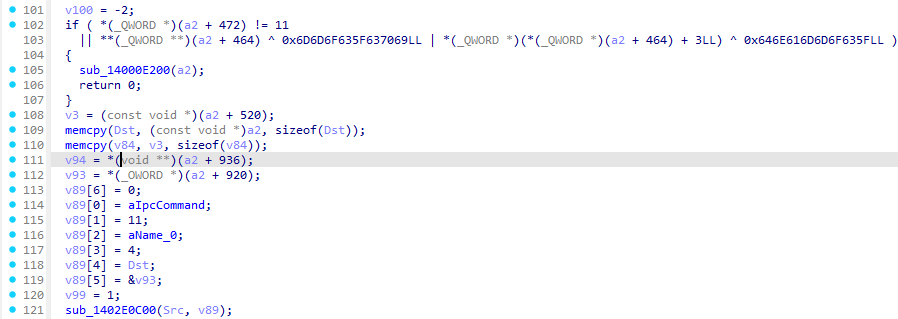
所以直接在ida pro找ipc_command和name字符串就能定位到后端逻辑函数了
找到后发现
把name(前端加密结果)传入v89,后边就分析v89就可以了
把这整个函数扔给ai,ai分析出是一个tea加密+一个base64加密
exp:
1
2
3
4
5
6
7
8
9
10
11
12
13
14
15
16
17
18
19
20
21
22
23
24
25
26
27
28
29
30
31
32
33
34
35
36
37
38
39
40
41
42
43
44
45
46
47
import base64b64 = "daF/DkQxixGmzn0aPFW2E2PhM8NabRtLjp6pI+c8TtY3WMuPxfnvlAsp9aluf8noZy/T6Sz9DJg=" ct = base64.b64decode(b64) KEYSTREAM = [232 ,0 ,230 ,97 ,0 ,0 ,88 ,88 ,0 ,118 ,233 ,0 ,91 ,8 ,29 ,213 ,0 ,224 ,188 ,251 ,252 ,20 ,20 ,0 ,0 ,0 ,0 ,0 ,0 ,0 ,222 ,119 ,0 ,0 ,177 ,0 ,0 ,0 ,0 ,0 ,0 ,0 ,149 ,8 ,120 ,233 ,187 ,175 ,0 ,3 ,3 ,0 ,238 ,96 ,0 ,0 ,241 ,87 ,73 ,96 ,0 ,31 ,31 ,0 ] KS = bytes (KEYSTREAM) C1 = 1668048215 C2 = 1949527375 C3 = 1937076784 C4 = 1432441972 DELTA = 2117703607 def swap32 (x ): return ((x & 0xFF ) << 24 ) | ((x & 0xFF00 ) << 8 ) | ((x >> 8 ) & 0xFF00 ) | ((x >> 24 ) & 0xFF ) def decrypt_block (block8 ): a = int .from_bytes(block8[0 :4 ], 'little' ) b = int .from_bytes(block8[4 :8 ], 'little' ) v11 = swap32(a) v12 = swap32(b) sum_ = DELTA * 32 for _ in range (32 ): v12 = (v12 - ( ((16 * v11 + C3) ^ (sum_ + v11)) ^ ((v11 >> 5 ) + C4) )) & 0xFFFFFFFF v11 = (v11 - ( ((16 * v12 + C1) ^ (v12 + sum_)) ^ ((v12 >> 5 ) + C2) )) & 0xFFFFFFFF sum_ = (sum_ - DELTA) & 0xFFFFFFFFFFFFFFFF return v11.to_bytes(4 ,'little' ) + v12.to_bytes(4 ,'little' ) plain = bytearray () for i in range (0 , len (ct), 8 ): block = ct[i:i+8 ] plain += decrypt_block(block) plain_b64 = bytes (plain).rstrip(b'\x00' ) middle = base64.b64decode(plain_b64) res = bytes (middle[i] ^ KS[i] for i in range (len (middle))) print (res.decode())
reference: Tauri 框架的静态资源提取方法探究 | yllhwa's blog
https://110.41.78.46/bk/index.php/archives/548/
您的支持将鼓励我继续创作!
打赏
微信支付